Billing Records (CDR)

Search and export Billing Records, or Call Detail Records, to review usage and investigate charges.

Billing Records, also called Call Detail Records (CDR), show detailed call activity for your account. Use them to review usage, investigate charges, and export call data.

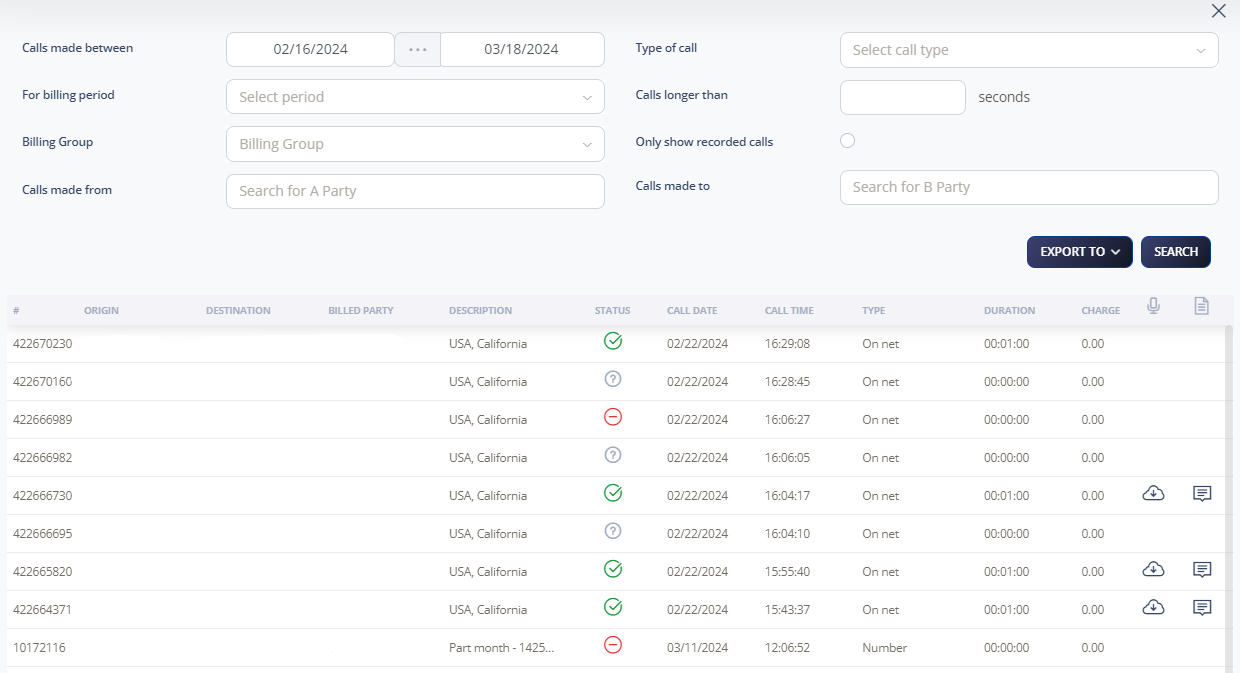
Note: Call records are displayed in U.S. Pacific Time.

Search billing records

  1. Log in to your 2talk account.
  2. Go to Billing > Billing Records.
  3. Set the search filters, such as date range, billing period, billing group, call type, call length, source, or destination.
  4. Click Search.
  5. Click Export CSV if you need a spreadsheet copy.

Use advanced search filters to narrow the results when looking for a specific call.
CDR fields

  • Account code.
  • Calling party.
  • Called party.
  • Channel used.
  • Destination changes.
  • Last application.
  • Call start, answer, and end times.
  • Call duration and billable seconds.
  • Call result.
  • Diverting number.
  • Unique call ID.
  • Hangup reason.

Billing records report

If call recording is enabled, you may also be able to download the recording or view the transcription from the call record.

Download a number report

  1. Go to Billing Records.
  2. Select the most recent Billing Period.
  3. Set Call Type to Number.
  4. Click Search.
  5. Download the report in CSV or TSV format.

Table of Contents