Global SIP Peering with Pilot and Failover Routing

Establish SIP peering with external networks by configuring peering numbers, pilot routing, primary/failover IPs, security, and call routing preferences.

Table of Contents

Purpose

Global SIP peering connects the phone system to external SIP networks and service providers for expanded calling and redundancy. Proper configuration enables interoperable routing, pilot-based inbound handling, and backup paths to maintain call reliability during outages or provider issues.

How to Navigate

Log in to the 2talk portal. Then, go to:
SwitchBoard | Preferences | SIP Peering Global section.
How to Configure

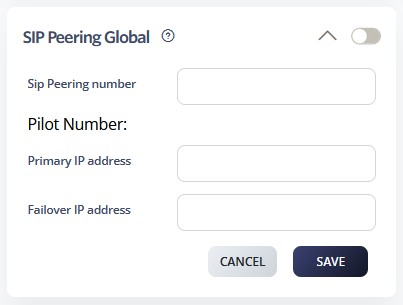
  • Enable SIP Peering Global using the main toggle
    • Configure the SIP Peering number for identification and routing association.
    • Set the Pilot Number for incoming peered calls to anchor inbound distribution.
    • Configure the Primary IP address for the main peering connection.
    • Set a Failover IP address for backup connectivity.
    • Configure authentication and security settings (e.g., credentials, IP-based trust, encryption)
    • Set routing preferences for peered calls to define path selection and handling rules.
    • Click SAVE to establish the peering connections.
  • Test connectivity with peering partners to confirm registration and call setup.
  • Monitor peering connection status and performance for stability.
  • Configure backup routes for redundancy and update them as network conditions change.