MicroSIP – Registering Your Numbers

Register a 2talk number in MicroSIP on Windows for inbound and outbound calling.

MicroSIP is a Windows SIP softphone that can register a 2talk number for inbound and outbound calling.
Before you start

  • Have your 2talk phone number and SIP password ready.
  • Use a Windows computer with a working microphone and speaker or headset.
  • Allow MicroSIP through Windows security prompts if asked.

Add your 2talk account

  1. Download and install MicroSIP on your PC.
  2. Open the app and click the arrow down button on the right-hand corner.
  3. Select Add Account.
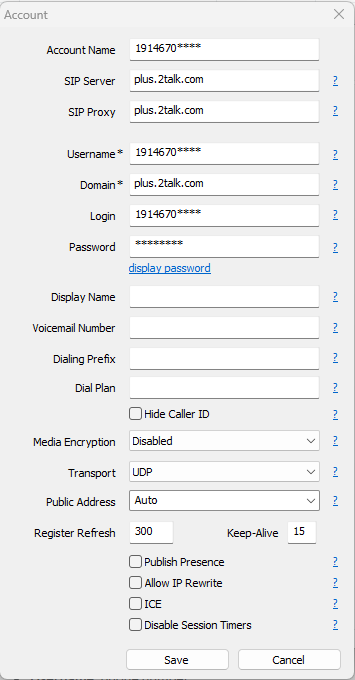
  4. Enter the 2talk SIP settings.
  • Username: Your full 2talk phone number
  • Domain: plus.2talk.com
  • Password: The SIP password for the number

MicroSIP account settings

Confirm registration

Save the account and check the MicroSIP status. When the account shows as registered, place a test call and confirm that audio works in both directions.

Table of Contents