Payment Settings

Manage automatic top-ups, low balance notifications, and monthly credit card billing for your account.

Payment Settings let you manage automatic top-ups, low balance notifications, and monthly credit card billing for your 2talk account.
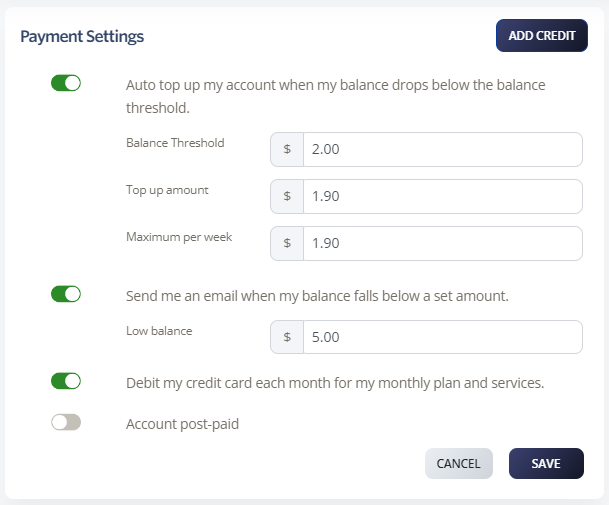
Payment settings

Auto top-up

Auto top-up charges your saved credit card and adds credit when your account balance drops below the threshold you set.

  1. Log in to your 2talk account.
  2. Go to Billing > Manage Billing.
  3. Turn on Auto top up my account when my balance drops below the balance threshold.
  4. Set the Balance Threshold.
  5. Set the Top-up Amount.
  6. Set the Maximum per week.
  7. Click Save.

Low balance notification

Low balance notifications email you when your account balance falls below a set amount.

  1. Go to Billing > Manage Billing.
  2. Turn on Send me an email when my balance falls below a set amount.
  3. Enter the Low Balance amount.
  4. Click Save.

Monthly credit card billing

You can allow 2talk to charge your saved credit card for monthly plan charges, services, and automatic top-ups.

  1. Go to Billing > Manage Billing.
  2. Turn on Debit my credit card each month for my monthly plan and services.
  3. Click Save.
Table of Contents