Polycom Firmware Upgrade for VVX Phones

Upgrade Polycom VVX firmware before provisioning when required features or supported versions are missing.

Update Polycom VVX firmware before provisioning when the phone is running an older version or missing required features.

Supported models include Polycom VVX 101/150, 201/250, 301/311/350, 401/411/450, 501, and 601.
Find the phone IP address

  1. From the phone home menu, select Settings.
  2. Select Status.
  3. Select Network.
  4. Select TCP/IP Parameters.
  5. Copy the IP address.

Upgrade firmware

  1. Enter https://<phone-ip-address> in a browser on the same network.
  2. Sign in with the admin password. The default is often 456.
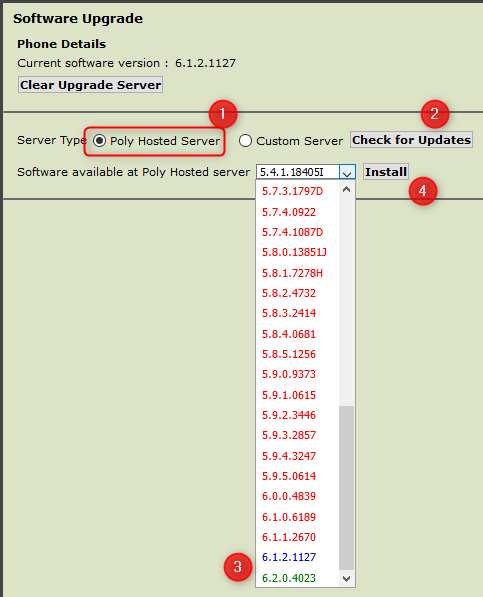
  3. Go to Utilities > Software Upgrade.
  4. Select Poly Hosted Server.
  5. Click Check for Updates.
  6. Select the latest available firmware.
  7. Click Install.
  8. Wait for the phone to reboot and complete the upgrade.

Polycom firmware upgrade

Table of Contents