Standalone SIP Peering for Direct Point‑to‑Point Connectivity

Configure a dedicated SIP peering link to a specific external system with IP, auth, ports, and routing rules for direct interconnection.

Table of Contents

Purpose

Configures a one‑to‑one SIP peering connection for direct communication with a specific external system or network. This bypasses centralized peering infrastructure to support dedicated integrations, lab interconnects, or site‑to‑site links requiring fixed routing and isolated control.

How to Navigate

Log in to the 2talk portal. Then, go to:
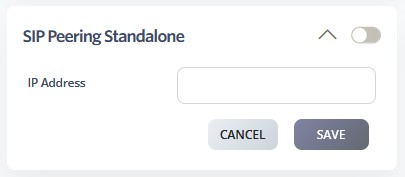
SwitchBoard | Preferences | SIP Peering Standalone section.
How to Configure

  • Enable SIP Peering Standalone using the toggle switch
    • Configure the peer IP Address for the standalone connection
    • Set authentication credentials if required by the peer
    • Configure port settings and protocol preferences
    • Define call routing rules for traffic sent to and received from the standalone peer
    • Configure security and firewall settings
    • Click SAVE to activate the standalone peering configuration
  • Test connectivity with the standalone peer
  • Monitor connection stability and call quality
  • Document the peering configuration for troubleshooting and change control
  • Set up monitoring and alerting for connection status