Change Codec Order on a Yealink Phone

Change codec priority on a Yealink phone to help prevent audio quality issues and one-way audio on 2talk calls.

Setting the right codec order on your Yealink phone helps prevent audio quality issues and one-way audio. For 2talk customers in the United States, PCMU should be your first-priority codec. This guide walks through changing the codec list from the Yealink web interface.
Prerequisites

  • A Yealink phone connected to your network.
  • A computer on the same network as the phone.
  • The phone’s admin credentials (the default is admin / admin; change this after first login).

Step 1: Find the phone’s IP address

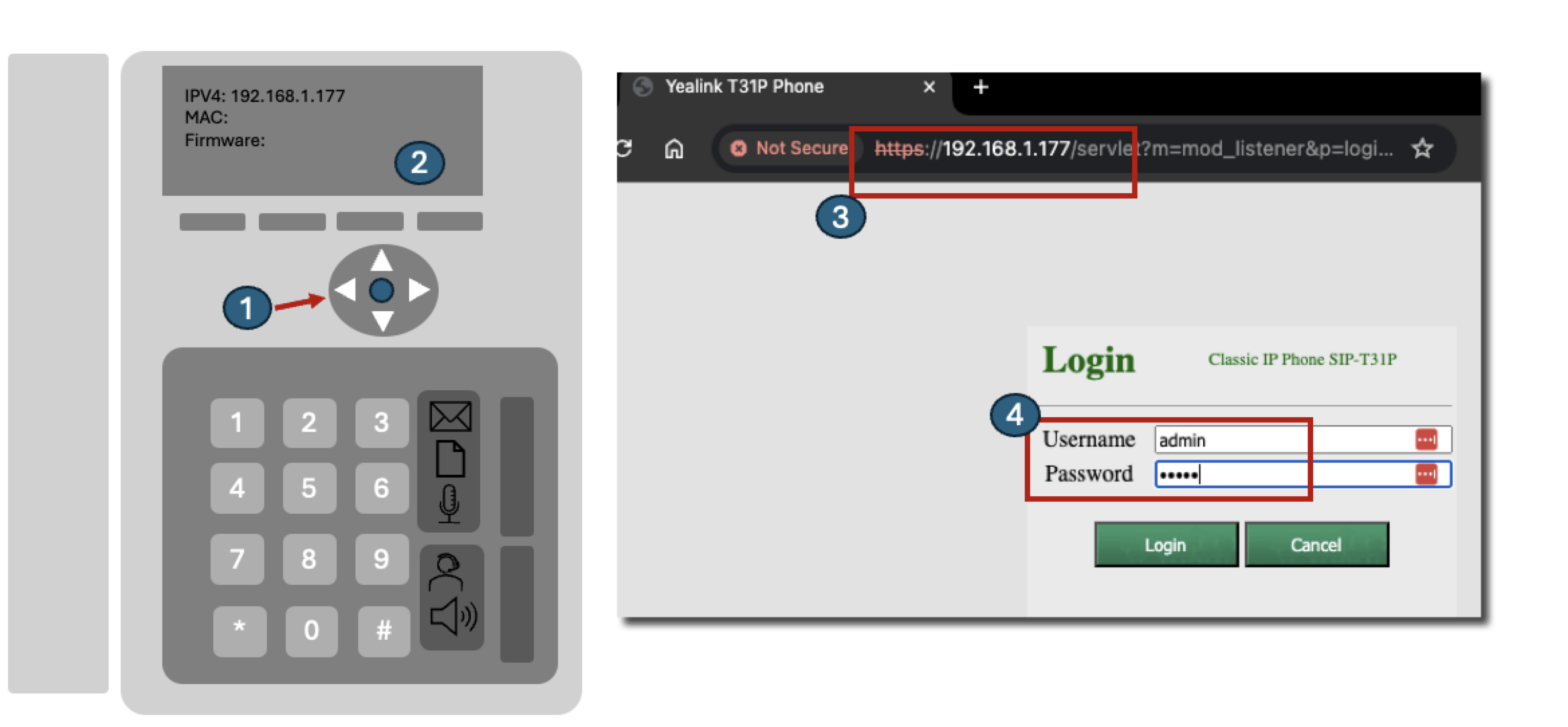
  1. On the handset, press the OK button to display the network status.
  2. Note the IPv4 address (for example, 192.168.1.177).

Step 2: Open the web interface

  1. In Chrome or Firefox, navigate to https://<phone-ip>.
  2. Your browser may warn that the connection is not secure because Yealink phones use a self-signed certificate. This is expected on a local device. Click Advanced > Proceed (Chrome) or Accept the Risk and Continue (Firefox) to continue.
  3. Sign in with your admin credentials.

Yealink web login

Step 3: Reorder the codecs

  1. Go to the Account tab in the top menu.
  2. In the left menu, select Codec.
  3. Review the Enabled Codecs list. You’ll see the G.711 codecs (PCMU and PCMA), G.722, G.729, and others.
  4. Move G.722 and G.729 to Disabled Codecs unless you specifically need them.
  5. Reorder the remaining codecs so PCMU is first and PCMA is second. This is the correct order for 2talk customers in the United States.
  6. Click Confirm (or Save) to apply the change.
  7. If the phone prompts to reboot, accept — some codec changes only take effect after a restart.

Security note

The browser warning shown below is normal for a Yealink phone’s local web interface. The connection is encrypted using a self-signed certificate, so traffic between your computer and the phone on your local network is still protected. After your first login, change the default admin password to something strong — especially if your phones are reachable from outside your LAN.

Table of Contents