Provision Yealink DECT Cordless Handsets

Provision Yealink DECT base stations with 2talk and manually pair cordless handsets to the base.

Yealink DECT base stations can be configured through 2talk Device Provisioning, but each cordless handset still needs to be paired with its base station manually.

Supported models include W52, W56, W70, and W76 series devices.
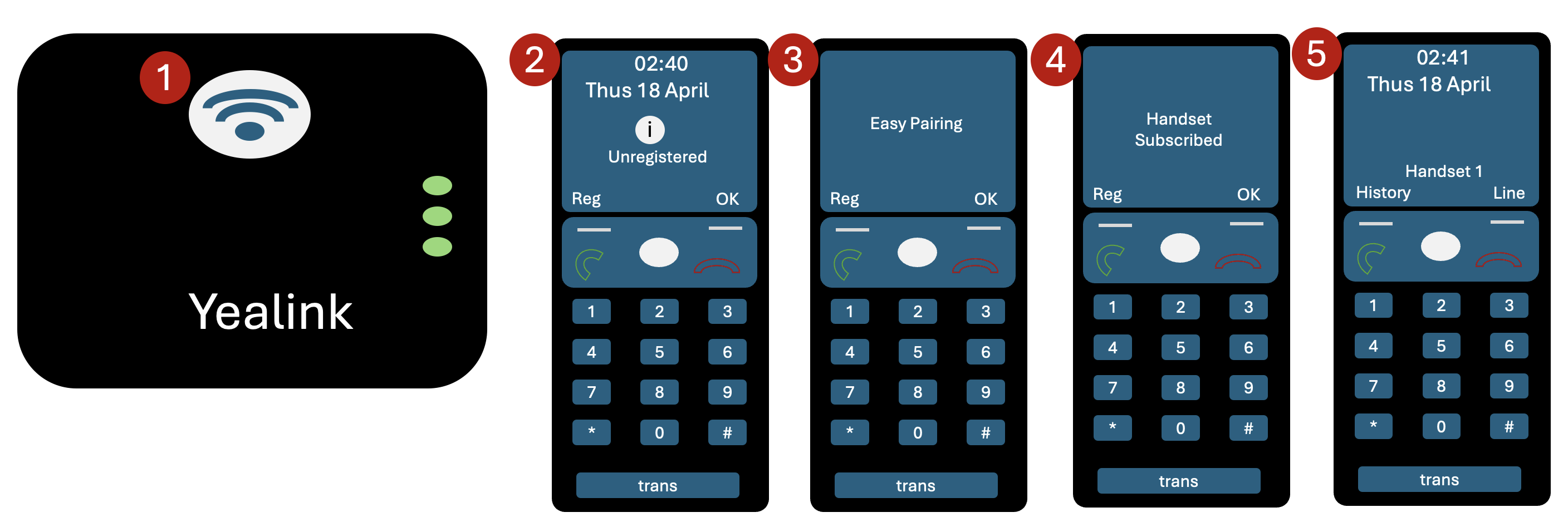
Pair a handset with the base station

  1. Press and hold the Pager button on the base station.
  2. On the handset, press the Reg key.
  3. Wait for Easy Pairing to appear.
  4. Confirm that the handset shows as subscribed.
  5. Confirm that the handset is registered.

Factory reset the base station

If you are moving a used Yealink DECT device to 2talk, factory reset it before provisioning.

  1. Press OK to open the main menu.
  2. Go to Settings > System Settings > Base Reset.
  3. Enter the system PIN. The default is usually 0000.
  4. Select Reset to factory.
  5. Wait for the base station to restart.

See also: Yealink Device Provisioning.

Table of Contents