Yealink Diagnostics

Export Yealink logs, packet captures, and configuration files for registration, audio, and network troubleshooting.

Yealink diagnostic tools can export logs, packet captures, and configuration files to help troubleshoot registration, audio, and network issues.
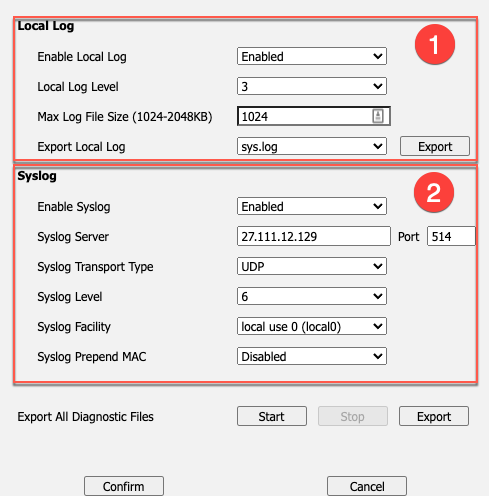
Yealink diagnostics

Open the Yealink web interface

  1. Press OK on the phone to display its IP address.
  2. Enter the IP address in a browser on the same network.
  3. Sign in with the phone admin username and password. The default is often admin / admin.
  4. Click Confirm.

Export local logs and PCAP

  1. Go to Settings > Configuration.
  2. Set the local log level to 6, then reboot the phone if required.
  3. Start PCAP capture.
  4. Reproduce the issue.
  5. Stop the capture.
  6. Export the PCAP trace.
  7. Export the configuration file if requested by support.

Configure Syslog

  1. Go to Settings > Configuration.
  2. Enable Syslog.
  3. Set Syslog Server to 27.111.12.129.
  4. Set Port to 514.
  5. Set Transport Type to UDP.
  6. Click Confirm.
Table of Contents