2talk App

Use the 2talk app to make calls, receive calls, check voicemail, send SMS, and manage numbers on iOS or Android.

The 2talk app lets you make calls, receive calls, check voicemail, send SMS,
and manage your 2talk numbers from an iOS or Android device.
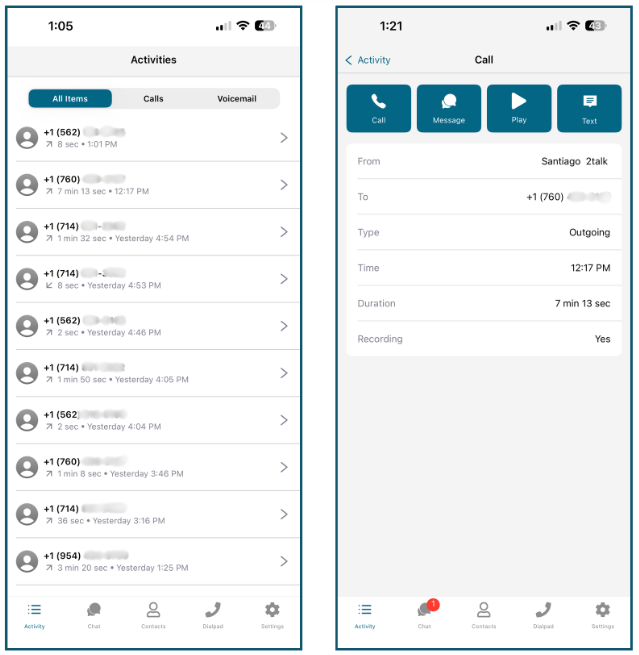
Activity

The Activity tab shows recent calls and voicemail messages in
chronological order.

  • Use tabs to filter by all items, calls, or voicemail.
  • Open an entry to view direction, start time, duration, and recording status.
  • Use quick actions to call back, send a message, play a recording, or share
    details.

Chat

The Chat tab is where SMS conversations appear.

  • Personal: Messages for your main 2talk number.
  • Shared: Messages for additional shared SMS numbers, when
    enabled.

SMS must be enabled on your account before you can send and receive messages.

Contacts

The Contacts tab shows contacts from your device. Use it to
search contacts, call contacts, send SMS, and mark favorites.

Dialpad

The Dialpad lets you place calls manually. Your active 2talk
caller ID is shown at the top. Tap the number at the top to switch the number
used for outbound calls.

Settings

  • Numbers: View and choose the default outbound number.
  • Language: Change the app language.
  • Permissions: Manage microphone, notification, and contact
    permissions.
  • Voicemail: Listen to and manage voicemail messages.
  • Version: View app and device details for support.
  • Logout: Sign out of the app.

Download the app

Download on the App StoreGet it on Google Play

Table of Contents