Call Recording and AI Transcription

Record inbound and outbound calls and use AI transcription to convert recordings into searchable text.

Call Recording captures inbound and outbound call audio for any 2talk number you choose. AI Transcription converts each recording into searchable text so you can review what was said without listening to the full audio.
Enable Call Recording

  1. Log in to your 2talk account.
  2. Go to Switchboard and select the number.
  3. Go to Advanced > Call Recording.
  4. Set your preferences (see below).
  5. Click Save.

Recording options

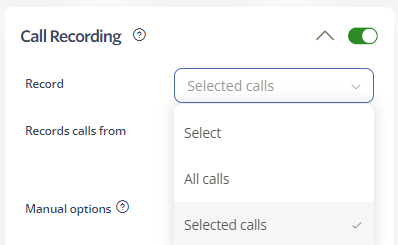
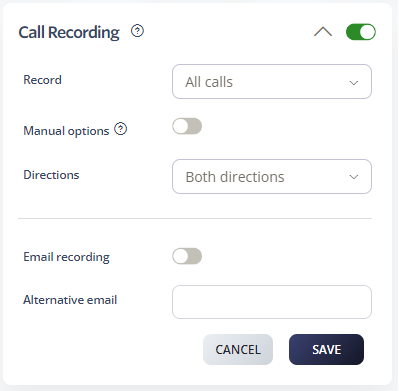
  • Record — All calls: every inbound and outbound call on the number is recorded.
  • Record — Selected calls: recording is triggered only for calls that match a number you specify, or that the user starts manually.
  • Manual options: when enabled, users can dial *3 mid-call to opt out of recording for that call.
  • Directions: choose to record in both directions, outbound only, or inbound only.
  • Email recording: emails a copy of every recording to the address in your Personal Details.
  • Alternative email: sends recordings to a different email address instead of (or in addition to) your Personal Details email.

Call Recording settings

Call Recording

AI Transcription

AI Transcription automatically generates a written transcript for every recorded call, making it easy to search past conversations and review key points without listening to the audio.

AI transcription

View a transcription

  1. Log in to your 2talk account.
  2. Go to Billing > Billing Records.
  3. Use the filters to find the call you want, then click Search.
  4. Click the Transcription icon on the call row to open the transcript.

Note: transcriptions are typically ready about 10 minutes after a call ends.

Legal notice

Call Recording must be used in compliance with applicable laws. In many US states, recording a call requires consent from at least one party, and some states require consent from all parties. Inform the other party that the call is being recorded before the conversation begins.

Table of Contents