Queue and Hold Music

Upload Queue and Hold Music so callers hear an audio file while waiting instead of ringing or silence.

Queue and Hold Music replaces standard ringing or silence with an uploaded audio file while callers wait. This can make long waits feel more professional and informative.
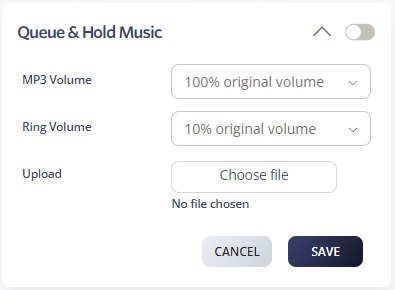
Upload Queue and Hold Music

  1. Log in to your 2talk account.
  2. Go to Switchboard > Advanced.
  3. Select Queue and Hold Music.
  4. Choose the volume setting.
  5. Click Choose file and select your MP3 file.
  6. Click Save.

Queue and Hold Music

File requirements

  • Use MP3 files.
  • Keep files short enough to be useful for callers who may not wait long.
  • Review the audio before uploading to confirm volume and quality.
Table of Contents