Understanding Media Files

Manage audio recordings used by Cloud PBX features such as auto attendants, voicemail greetings, and caller music.

Media files are audio recordings used by Cloud PBX features such as auto attendants, voicemail greetings, caller music, and call queues. You can record messages in the relevant feature or upload prepared MP3 files in the Media section for a number.

Supported file format

  • Use MP3 files.
  • Convert WAV or other audio formats to MP3 before uploading.
  • Keep files under 1.5 MB.
  • Use standard voice-quality audio, such as 41 kHz or lower.

If a voicemail greeting or other media file stops playback immediately, check the file format and size first.
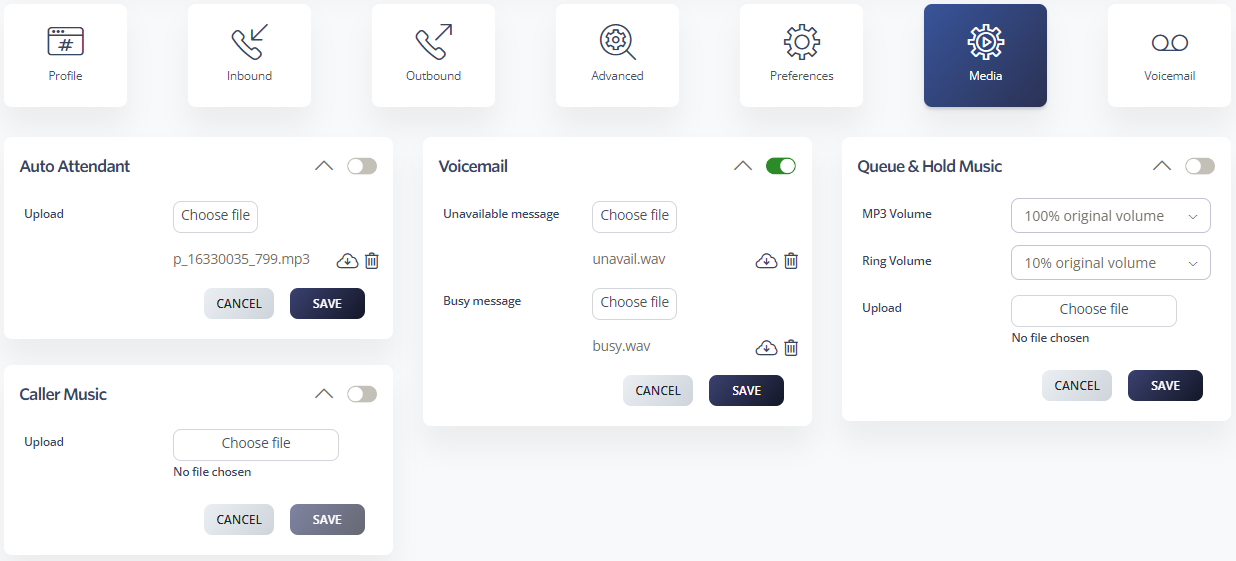
Upload a media file

  1. Log in to your 2talk account.
  2. Go to Switchboard > Media.
  3. Select the number that will use the media file.
  4. Choose the feature or media slot you want to update.
  5. Select the MP3 file.
  6. Click Save.

Where media files are used

  • Auto Attendant greetings
  • Caller Music
  • Voicemail unavailable and busy greetings.
  • Call Queue and Hold Music

Media settings

Table of Contents