Call Flow Priority

Understand the priority order 2talk Cloud PBX uses to route inbound calls through enabled features.

Call Flow Priority controls the order in which Cloud PBX features handle an inbound call. When a call reaches a number, 2talk checks the enabled features in priority order and routes the call based on the first matching rule.

How priority works

  • An inbound call reaches your 2talk number.
  • Cloud PBX checks each enabled feature in order.
  • The first active feature that matches the call handles it.
  • Some features can post-dial to another feature, such as forwarding to voicemail after an auto attendant.

Priority order

  1. Call Rejection
  2. Conference
  3. Auto Attendant, then Call Forwarding, then Voicemail
  4. Call Queue, then Call Forwarding, then Voicemail
  5. Do Not Disturb, then Call Forwarding, then Voicemail
  6. Call Screening, then Call Forwarding, then Voicemail
  7. Call Forwarding, then Voicemail
  8. Simultaneous Ring, then Call Forwarding, then Voicemail
  9. Hunt Group, then Call Forwarding, then Voicemail
  10. Voicemail
  11. Time Schedules

Post-dial routing

Post-dial routing sends a call from one feature to another after the first feature finishes. For example, an auto attendant can play a greeting and then post-dial to call forwarding or voicemail.
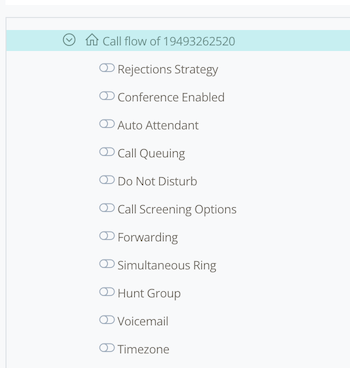
Call flow priority

Table of Contents